
Call Us
(916) 789-9929
CD Replication Printing Templates
 Your disc label artwork should be provided as an electronic file matching one of
our three templates.
Your disc label artwork should be provided as an electronic file matching one of
our three templates.
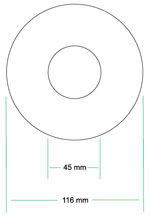
The Standard CD label template is used for basic disc label designs. The art dimensions are 116 mm for the outer edge and 45 mm for the inner edge. The image area extends from the edge of the disc to the outer edge of the mirror band.
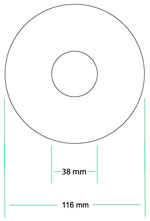
The Extended Image CD label template provides for a larger disc label image area. The art dimensions are 116 mm for the outer edge and 38 mm for the inner edge. The image area extends from the outer edge of the disc to the inside edge of the mirror band. Because the art extends over the mirror band it is recommended that type and small graphics do not extend over the mirror band unless a solid background is added to cover the mirror band.
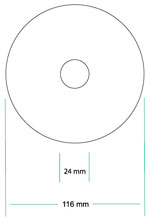
The Maximum Image Area CD label template provides the largest label size. This layout is used for most Full color offset printed CDs. A white layer is printed and then the four color process colors are printed over the top of the white layer. The art dimensions are 116 mm for the outer edge and 24 mm for the inner edge.
Check with customer service before you send your artwork to insure the template that you have selected is appropriate for your project.
You supply your disc artwork as an electronic file set to one of our standard templates. Our preferred file formats for artwork are: Adobe CS3 or lower versions of Illustrator, InDesign, Photoshop, and EPS file. A high resolution tif file can also be used for CMYK art. Generally we can accept all of the professional grade page layout and design programs on both the Macintosh and Windows platforms. Fonts should be converted to outlines whenever possible.
Art must be set up as either CMYK color or Spot Pantone colors. RGB color is not appropriate for printing. RGB colors will be converted to CMYK and may cause unexpected color shifts.
Need to send us an art file? Use our file upload utility.
Tips for Creating Your CD Label Artwork
The surface of the disc is silver not white. Many people use the silver surface in their design. Others will print a solid color for the background and then design their art to print on top of this background color.
We strongly recommend that you use type no smaller than 6 pts. For type to be legible, the color of the type must contrast with the background. Type of a solid color is easier to read than type that is a blend of colors.For CMYK images we strongly recommend offset printing over a white background. Images with screens, blends, and halftones generally look best when printed using the offset printing process.
Images with large areas of solid PMS colors look best when silk screen printed.
Contact our customer service representatives if you have any questions (ph: 916 789-9929, e-mail: sales@bizreplication.com ).